Expense Tracking Software Explained for Small Businesses

Expense tracking software is defined as a digital system that automates how small businesses and freelancers record, categorize, and analyze their business expenses. The industry term for this category is expense management software, and the two phrases are used interchangeably across accounting and finance. Modern platforms use OCR (Optical Character Recognition) receipt scanning, bank feed integration, and automated categorization to replace manual spreadsheet entry. Tools like Taxbatchpro extend this further by converting scanned bank and credit card statement PDFs into structured, IRS-ready Excel spreadsheets in under 90 seconds. For freelancers and small business owners, the practical benefit is clear: less time on bookkeeping and fewer errors at tax time.
What is expense tracking software and how does it work?
Expense tracking software automates the recording, categorization, and analysis of business expenses using OCR and bank feed integration. That definition covers a lot of ground, so it helps to break the process into four functional layers.
1. Capture. The software collects expense data from two primary sources: receipt photos (processed with OCR) and direct bank or credit card feeds. OCR reads the merchant name, date, and amount from a receipt image and converts it into structured data. Bank feeds pull transactions automatically from connected accounts.

2. Categorization. Once captured, transactions are sorted into spending categories. Most platforms use Merchant Category Codes (MCCs), which are four-digit codes assigned by card networks to classify merchants by industry. Machine learning refines these assignments over time based on your historical patterns.
3. Policy enforcement. The software checks each transaction against your spending rules. A flagged transaction, such as a meal expense above your per-diem limit, triggers an alert or holds the expense for review. Automation reduces fraud risk by creating audit logs and flagging duplicate or out-of-policy expenses in real time.
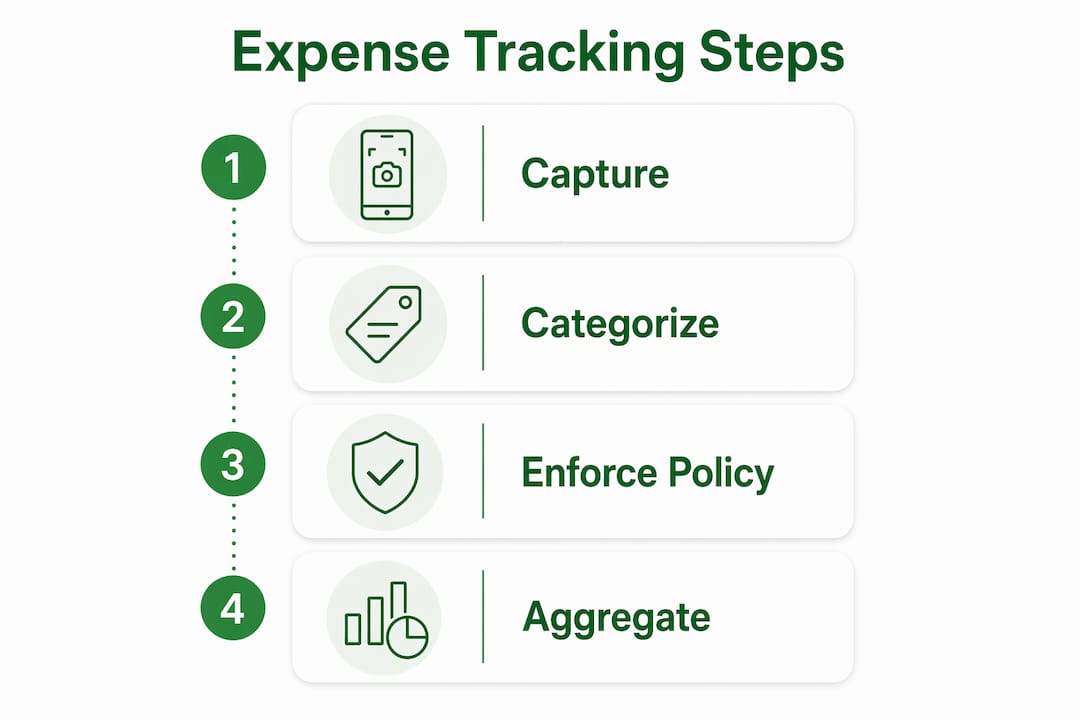
4. Aggregation. Approved expenses roll up into dashboards and reports. You see spending by category, vendor, project, or time period. These reports feed directly into your accounting system or tax preparation workflow.
Automation can misclassify transactions if your business is not properly registered with card networks, which makes manual oversight a non-negotiable step. The software accelerates the process; a human still needs to verify the output.
Pro Tip: Set aside 15 minutes every Friday to review flagged transactions and reconcile your bank feed. This weekly habit keeps your records audit-ready without requiring a major year-end cleanup.
What are the top features to look for in expense tracking apps?
The most effective expense tracking applications share a core set of features, but not every feature matters equally for a small business or freelancer. Prioritize based on your actual workflow, not a vendor's feature checklist.
Core features worth evaluating:
- Automated categorization. The software maps transactions to your general ledger or IRS Schedule C categories without manual input. This is the single biggest time saver.
- Receipt capture with OCR. Mobile receipt scanning eliminates paper storage and manual transcription errors.
- Real-time dashboards. Spending visibility by category or project helps you catch budget overruns before they compound.
- Policy enforcement. Spending rules and approval workflows matter most for businesses with employees or contractors submitting expenses.
- Accounting system integration. Integration with accounting software reduces data silos and provides a full, real-time financial picture. This is the feature most worth prioritizing over anything else.
- Multi-currency support. Freelancers working with international clients need this from day one.
Pricing models follow a predictable pattern. Many platforms offer free tiers for one to three users, with subscription-based plans scaling for larger businesses that need custom workflows, compliance controls, and ERP integrations. A solo freelancer rarely needs an enterprise plan. Starting with a free or entry-level tier and upgrading as your volume grows is the practical approach.
The benefits of expense tracking software compound over time. Accurate categorization reduces errors at tax filing. Real-time dashboards improve cash flow decisions. Audit logs protect you during an IRS review. The importance of expense tracking becomes most visible when you face a deadline or an audit and your records are already organized.
How can small business owners and freelancers implement expense tracking effectively?
Implementation determines whether expense tracking software pays off or becomes another unused subscription. The technology is only as good as the process behind it.
Building a correct financial workflow for expense categorization is critical. Software alone cannot fix a broken process. Before you configure any platform, map your expense categories directly to your general ledger or IRS Schedule C line items. This alignment means every transaction captured by the software lands in the right bucket for tax preparation without manual reclassification later.
Practical steps for effective implementation:
- Process expenses daily or weekly. Processing expenses on a consistent schedule is the most effective workflow for maintaining audit readiness and reducing tax preparation time. Letting receipts pile up for months creates reconciliation bottlenecks.
- Reconcile bank feeds with receipts. Failing to match your bank feed transactions to physical or digital receipts is the most common pitfall. Do this at least weekly.
- Align categories with tax requirements. Map your expense categories to IRS Schedule C or your specific tax form before you start. Reclassifying hundreds of transactions at filing time wastes hours.
- Keep software complexity proportional to your business size. A freelancer with 200 transactions per month does not need the same platform as a company processing 10,000.
- Verify automated outputs. Review categorization exceptions and flagged transactions every week. Automation handles the volume; you handle the judgment calls.
- Use a dedicated business account. Mixing personal and business expenses forces manual separation later and increases error risk.
Pro Tip: Before selecting any platform, export three months of your bank statements and count your monthly transaction volume. That number tells you exactly which pricing tier and feature set you actually need, not what a sales page suggests.
The freelancer tax prep checklist from Taxbatchpro covers expense processing for audit readiness in detail, including how to align categories with Schedule C from the start.
What common mistakes do businesses make with expense tracking software?
Most implementation failures trace back to a small set of repeatable mistakes. Recognizing them before they happen saves significant time and money.
- Choosing enterprise-grade tools for small-scale needs. Many small business owners select enterprise-grade software unnecessarily, adding complexity and cost without benefit. Starting with tools that integrate directly with your existing accounting software saves time and effort.
- Overrelying on automation without verification. Automated categorization is accurate most of the time, not all of the time. Manual oversight remains essential to verify automated categorization and ensure audit readiness, especially when reconciling bank feeds with receipts.
- Ignoring integration requirements. Selecting a platform that does not connect to your accounting system creates a data silo. You end up exporting and importing files manually, which defeats the purpose of automation.
- Skipping regular reviews. Inaccuracies compound when left unchecked. A miscategorized transaction in january becomes a tax filing problem in april if no one catches it during the year.
- Failing to align categories with tax requirements. Expense categories that do not map to IRS Schedule C or your specific tax form require manual reclassification at filing time. This is preventable with upfront configuration.
- Neglecting policy enforcement features. For businesses with employees or contractors, skipping spending rules creates reimbursement fraud exposure. Expense reimbursement schemes are a documented fraud type, and continuous tracking mitigates the risk.
Reducing bookkeeping errors requires both the right software and the right habits. Taxbatchpro's guide on minimizing bookkeeping errors covers the process side in detail.
Key takeaways
Expense tracking software works best when paired with consistent weekly workflows, correct category mapping, and integration with your accounting system.
| Point | Details |
|---|---|
| Define before you automate | Map expense categories to IRS Schedule C or your general ledger before configuring any software. |
| Process expenses weekly | A weekly review habit prevents year-end reconciliation bottlenecks and keeps records audit-ready. |
| Prioritize integration | Choose software based on accounting system compatibility, not feature count or price alone. |
| Match software to your scale | Entry-level tools handle most freelancer and small business needs without enterprise complexity. |
| Verify automated outputs | Review flagged and miscategorized transactions weekly; automation handles volume, not judgment. |
Why I think most small businesses get expense tracking backwards
After years of watching small business owners and freelancers set up financial systems, I have noticed a consistent pattern. Most people shop for software first and build their process second. That order is backwards, and it explains why so many expense tracking implementations fail quietly.
The software is not the hard part. Configuring a bank feed takes 20 minutes. The hard part is deciding what "office supplies" means in your business, whether a client dinner belongs under meals or marketing, and how you will handle the gray-area transactions that show up every month. Those decisions have to happen before the software can categorize anything correctly.
The other mistake I see constantly is treating automation as a replacement for review. Automated categorization using MCCs and machine learning is genuinely impressive, but it operates on patterns. When a transaction breaks the pattern, the software guesses. A freelance designer who buys camera equipment for a client project will likely see that transaction land in the wrong category. Without a weekly review, that error sits in the books until tax time.
My honest recommendation: spend one hour mapping your expense categories to your tax form before you touch any software. Then commit to a 15-minute weekly review. Those two habits will do more for your financial accuracy than any feature upgrade.
How Taxbatchpro fits into your expense management workflow
Taxbatchpro is built for the part of expense management that most software ignores: converting your existing bank and credit card statement PDFs into structured, tax-ready data. If you have months or years of statements sitting in your inbox, Taxbatchpro processes them in batch, automatically mapping transactions to IRS Schedule C categories in under 90 seconds per year of statements.
For freelancers and small business owners who need IRS-ready statement conversion without hiring a bookkeeper, Taxbatchpro handles the extraction and categorization so you can focus on verification and filing. The platform also supports accounting professionals who need to process client statements at volume through its statement extraction service.
FAQ
What is expense tracking software used for?
Expense tracking software records, categorizes, and reports business expenses automatically using OCR receipt scanning and bank feed integration. Small businesses and freelancers use it to reduce manual bookkeeping errors and prepare accurate tax filings.
How does expense tracking software work?
The software operates through four stages: capturing expense data from receipts and bank feeds, categorizing transactions using Merchant Category Codes and machine learning, enforcing spending policies, and aggregating data into reports and dashboards.
What features matter most in expense tracking apps?
Accounting system integration is the most critical feature, followed by automated categorization, OCR receipt capture, and real-time reporting. Choose based on your existing accounting workflow, not feature volume.
Is free expense tracking software good enough for freelancers?
Free tiers from most platforms support one to three users and cover core receipt capture and categorization. A solo freelancer with straightforward expenses can operate effectively on a free plan until transaction volume or tax complexity increases.
How often should I review my expense tracking records?
A weekly review of flagged transactions and bank feed reconciliations is the recommended standard for audit readiness. Monthly reviews are the minimum; anything less creates compounding errors that are costly to fix at tax time.